
Introduction
Education has shifted dramatically in the last decade, moving from traditional, lecture-based instruction to interactive, student-centered learning. In this evolving environment, teachers are constantly seeking tools that boost engagement, diversify instruction, and spark genuine excitement for learning. Among the many digital platforms available today, Blooket has emerged as one of the most innovative and impactful educational tools for modern classrooms, homeschooling environments, and remote learning setups. Its success is rooted not only in its colorful visuals and entertaining gameplay, but in the powerful pedagogical model it supports—one where students learn through exploration, competition, collaboration, and strategic thinking.
At its core, Blooket is a game-based learning platform that transforms academic content into fun, fast-paced game modes. Instead of asking students to simply answer questions on a worksheet, Blooket embeds those questions into dynamic game scenarios involving treasure hunts, battle royales, tower defenses, and more. The transformation is remarkable: what once felt like review sessions suddenly becomes a classroom highlight, with students eagerly participating, cheering, and fully immersing themselves in the learning process.
What Blooket Is
Blooket is an online educational tool that allows teachers to host games, build question sets, assign homework, and monitor results—all through a simple browser-based interface. Students join games instantly using a unique code, with no account creation required. This ease of access reduces barriers and allows every student, regardless of age or digital familiarity, to participate fully.
Each Blooket game revolves around a set of questions. These questions can be created by teachers, imported from other platforms, or selected from Blooket’s vast library of publicly shared sets. Once a question set is chosen, the teacher selects a game mode—each with its own rules and gameplay mechanics. Students then answer questions and earn rewards or advantages within the game, making learning feel like an adventure rather than an obligation.
Who It’s For
One of Blooket’s strengths is its versatility. It can be used effectively in:
- Traditional classrooms
- Virtual and hybrid classrooms
- Homeschool programs
- After-school tutoring
- Student-led study sessions
- Gamified learning environments
Teachers appreciate Blooket because it works with any subject—math, history, geography, vocabulary, science, social studies, grammar, and even test-preparation skills. Parents find it useful because it makes at-home learning fun and interactive. Students love it because they feel like they are playing instead of studying. This broad applicability has made Blooket a favorite across grade levels, from early elementary students who enjoy its simple question sets and friendly characters to high school students who enjoy more competitive modes.
Why Blooket Is Popular
The rise of Blooket can be attributed to several factors. First, students are naturally drawn to game-based learning. When lessons feel like games, motivation increases, participation becomes more consistent, and retention improves. Blooket capitalizes on this by offering visually appealing game modes that encourage strategic decision-making, not just fast answering.
Second, Blooket is incredibly teacher-friendly. Its interface is clean, intuitive, and requires almost no learning curve. Teachers can set up a game in minutes, adjust settings with ease, and instantly view student performance. Because it integrates seamlessly with existing curriculum content, it saves time while enriching lessons.
Additionally, Blooket emphasizes continuous improvement through seasonal updates, new game modes, and collectible items called “Blooks.” Students love unlocking new Blooks, which keeps them coming back enthusiastically. The platform’s balance of competition and learning creates a unique environment where even reluctant learners find themselves wanting to participate.
Finally, Blooket has gained popularity because it supports meaningful pedagogy. It aligns with modern education trends like formative assessment, active learning, differentiation, and student engagement. It encourages collaboration and healthy competition while giving teachers insights into student performance that would be difficult to capture in traditional settings.
In a world where attention spans are shrinking and education technology is rapidly evolving, Blooket stands out as a tool that genuinely improves both teaching and learning. It blends fun with academic rigor, making it one of the most valuable digital resources in the modern educator’s toolkit.
What Is Blooket & How It Works
Blooket is more than just a digital trivia game—it is a complete interactive learning ecosystem designed to make education engaging, dynamic, and student-centered. While many other learning platforms focus solely on quizzes or flashcards, Blooket elevates the experience by embedding knowledge checks into immersive, themed games. Because of this unique approach, both teachers and students benefit academically, socially, and behaviorally. Understanding how Blooket works requires looking at its core components: how the platform is structured, how games operate, and how the experiences differ for teachers and students.
Short Definition
At its simplest, Blooket is a web-based learning platform that converts question sets into playable games. Teachers create or choose question sets, host a game, and students join using a code. As students answer questions, they interact with the game world—collecting gold, fighting enemies, building defenses, racing against others, or collaborating in teams. Every correct answer gives them an advantage within the chosen game mode.
This design reinforces the idea that knowledge has immediate, rewarding outcomes. Because players must answer correctly to progress, students become more motivated to learn, and the learning becomes naturally fun, competitive, and memorable.
How Games Function
Blooket games follow a clear and efficient structure that keeps gameplay smooth and fast-paced for classrooms or remote sessions.
1. Choose or Create a Question Set
Teachers can:
- Create their own questions
- Import sets from Quizlet
- Browse thousands of public sets
Each set can include text, images, and multiple-choice answers.
2. Select a Game Mode
The teacher selects a game mode, such as Gold Quest, Tower Defense, Crazy Kingdom, or Battle Royale. Each mode has different mechanics, rules, and goals. For example:
- One mode might require players to open treasure chests.
- Another might ask them to build towers and defend against waves of enemies.
- Some modes are strategy-based rather than speed-based.
Same questions, totally different gameplay experiences.
3. Students Join the Game
Students enter the game via:
- Game code
- QR code
- Sharable link
No account is required, which makes it beginner-friendly and age-flexible.
4. Players Answer Questions
Once the game begins, students answer questions at their own pace. Every correct answer benefits them within the game—giving points, energy, gold, or other rewards depending on the mode. Incorrect answers slow progress or give fewer advantages, helping reinforce learning.
Because the platform does not punish students severely for mistakes, students feel encouraged to try again, review concepts, and keep participating.
5. Real-Time Gameplay
Throughout the game:
- Students compete or collaborate
- Status boards update in real time
- The host can monitor progress
- Players remain engaged through colorful visuals and animations
This keeps the entire classroom lively and enthusiastic.
6. End-of-Game Results
At the end of the session, teachers receive detailed data about:
- Which questions were answered correctly or incorrectly
- How each student performed
- Class-wide patterns
- Scores and rankings
This makes Blooket a powerful tool for assessment.
Teacher vs. Student Experience
Teacher Experience
Teachers enjoy a high level of control and customization. They can:
- Host live games
- Assign homework for self-paced learning
- Set timers, randomization, and scoring rules
- Track performance analytics
- Save question sets in folders
- Duplicate or remix sets for different classes
The intuitive interface allows teachers to run complex game sessions with minimal preparation time.
Student Experience
From the student perspective, Blooket feels like a video game rather than classwork. Players:
- Join instantly
- Customize their nickname
- Collect coins, tokens, and Blooks
- Play multiple game modes
- Compete or collaborate
- Practice subjects in an enjoyable environment
The platform meets students where they are, using game mechanics that mirror modern mobile games and online multiplayer experiences. This makes learning feel natural, relatable, and engaging.
Why the System Works
Blooket’s structure aligns with proven learning principles:
- Repetition strengthens memory
- Competition boosts engagement
- Immediate feedback improves understanding
- Visual learning increases retention
- Gamification motivates even reluctant learners
By integrating these principles seamlessly, Blooket becomes more than just a game—it becomes a learning experience that students look forward to.
Blooket’s success in classrooms and learning environments comes from a robust set of features designed to enhance engagement, streamline teaching, and support different learning styles. While many educational platforms offer quizzes or interactive exercises, Blooket stands out because it integrates a wide variety of features that turn simple question sets into full-scale gaming experiences. These features appeal to teachers who need simplicity and efficiency while simultaneously appealing to students who crave excitement, rewards, and challenges. Below are the most impactful and widely appreciated features of the Blooket platform.
Key Features
Blooket’s success in classrooms and learning environments comes from a robust set of features designed to enhance engagement, streamline teaching, and support different learning styles. While many educational platforms offer quizzes or interactive exercises, Blooket stands out because it integrates a wide variety of features that turn simple question sets into full-scale gaming experiences. These features appeal to teachers who need simplicity and efficiency while simultaneously appealing to students who crave excitement, rewards, and challenges. Below are the most impactful and widely appreciated features of the Blooket platform.
Game Modes
One of the most distinctive features of Blooket is its diverse library of game modes. Each mode transforms the same set of questions into a completely different experience, which keeps students excited even when reviewing familiar content.
Variety and Replayability
Students can play:
- Competitive modes
- Strategy-based modes
- Team modes
- Solo modes
- Timed modes
- Endless gameplay modes
This variety ensures that learning never feels repetitive. For example, a set of multiplication questions might be used in Gold Quest, where students open treasure chests; Tower Defense, where they build towers to stop enemies; or Battle Royale, where students compete in elimination rounds.
Classroom Engagement
Switching between game modes allows teachers to maintain high engagement levels throughout the school year. A lesson that may feel dull using traditional methods becomes lively when students know they will soon play a Blooket game they enjoy. Even reviewing for exams becomes fun when gameplay mechanics keep the excitement high.
Custom Question Sets
Customization lies at the heart of Blooket’s flexibility. Teachers can create tailored question sets that align with their curriculum, specific lesson goals, or even student-level differentiation.
Multiple Ways to Create Content
Blooket supports:
- Manual question creation
- Importing from Quizlet
- Editing public sets
- Duplicating existing sets
- Adding images to questions
This gives teachers full creative freedom to design lessons tailored perfectly to their students’ needs.
Adaptability Across Subjects
Whether teaching:
- Math
- Science
- History
- Reading
- Foreign languages
- Geography
- Test preparation
Blooket accommodates every subject. A language teacher can add images of objects to build vocabulary, while a science teacher can include diagrams of cells, planets, or chemical structures.
Organization Tools
Teachers can organize sets into folders, favorite important sets, and quickly find previously used materials. This saves time and streamlines lesson planning throughout the school year.
Points and Coins System
Blooket incorporates a reward system that encourages continuous motivation and replay.
Coins
Students earn coins by participating in games. These coins can be used to purchase Blooks—collectible characters that make gameplay even more enjoyable.
Points and Bonuses
In many game modes, correct answers reward:
- Points
- Power-ups
- Items
- Resources
- Abilities
This creates an instant feedback loop—answer correctly, get rewarded. It’s a system that mirrors popular mobile games, which helps keep students motivated.
Blooks
These collectible avatars are one of the biggest student motivators. Students enjoy unlocking rare Blooks, showing their collections, and customizing their presence in the game.
Analytics and Feedback
For teachers, data is essential, and Blooket provides it in a clear, accessible format.
Performance Tracking
After hosting a game, teachers can view:
- Which questions were answered correctly
- Where students struggled
- Individual student performance
- Class-wide trends
This helps teachers identify learning gaps instantly.
Exportable Reports
Teachers can export data for:
- Gradebooks
- Progress reports
- Parent meetings
- Intervention planning
The analytics feature transforms Blooket into a powerful assessment tool.
Classroom Management Tools
Blooket gives teachers several ways to maintain order during gameplay.
Controls Include:
- Timer on/off
- Random question order
- Adjusting difficulty
- Team mode options
- Muting or removing players
- Ending games early
- Limiting player names
- Changing point rules
These controls allow teachers to tailor the experience to match learning goals or classroom behavior conditions.
Remote Learning Support
Because Blooket is browser-based, students can access it from:
- Chromebooks
- Laptops
- Tablets
- Smartphones
Asynchronous Learning
Homework and solo modes support learning outside the classroom. This makes Blooket ideal for:
- Remote classes
- Homework assignments
- Early finishers
- Exam practice
- Self-paced review
Students can learn anytime, anywhere.
Blooket’s key features work together to create a platform that is flexible, engaging, data-rich, and accessible. These features are the foundation of its popularity and effectiveness in modern education.
How to Get Started
Getting started with Blooket is simple and user-friendly, making it accessible to teachers, students, tutors, parents, and even young learners. Whether you’re using the platform for a classroom activity, remote learning session, or at-home study time, the setup process is quick and intuitive. This section provides a detailed breakdown of everything you need to know before you begin using Blooket, including account creation, requirements, platform navigation, and an overview of the Blooket dashboard. Understanding these foundations will ensure you are fully prepared to use the platform effectively.
4.1 Create an Account
Creating an account on Blooket is optional for students but required for teachers. The platform keeps the sign-up process streamlined so you can start building lessons within minutes.
Requirements
Before creating an account, make sure you meet the basic criteria:
- Age Requirements
- 13 years or older in most regions
- 16+ in regions with stricter privacy laws
Students under 13 can still play Blooket, but must join games without creating an account.
- A Valid Email Address
You must provide a functional email to verify your account unless you sign up using Google. - Internet Browser
Blooket works on all modern browsers including Chrome, Safari, Firefox, and Edge. No software installation is needed. - A Device with Internet Access
Compatible with:- Laptops
- Desktops
- Tablets
- Chromebooks
- Mobile phones
If these basic conditions are met, you can start using Blooket immediately.
Teacher vs. Student Accounts
Blooket distinguishes between teacher accounts and student accounts, each offering different tools and benefits.
Teacher Accounts
A teacher account provides full access to:
- Creating custom question sets
- Hosting live games
- Assigning homework
- Accessing analytics and student results
- Saving or duplicating public sets
- Organizing content in folders
- Using advanced settings
- Access to Plus features (if subscribed)
Teachers rely on these tools to create structured lessons that align with curriculum standards.
Student Accounts
Students do not need an account to play, which helps younger learners participate safely. However, if a student chooses to create an account (and meets the age requirement), they get access to:
- Saving earned coins
- Collecting Blooks
- Tracking gameplay history
- Using tokens to unlock character boxes
- Following teachers or favorite sets (if allowed)
Creating an account enhances the student experience, but joining games without one is perfectly fine.
Google Login
Blooket supports Google sign-in for quick, secure access. This feature is especially convenient for:
- Schools using Google Classroom
- Students familiar with Chromebooks
- Teachers who prefer not to remember additional usernames
You can sign up or log in using your existing Google account with a single click. This eliminates the need for email verification and speeds up onboarding.
4.2 Blooket Dashboard Overview
Once your account is created, you are taken to the Blooket Dashboard, the central hub for all your teaching or playing activities. The dashboard is designed for clarity and efficiency, displaying everything you need in a simple layout.
Here’s a detailed breakdown of each section on the dashboard:
1. My Sets
This is where all your created question sets are stored. You can:
- Edit sets
- Duplicate sets
- Delete sets
- Share or assign sets
- Host games instantly
Over time, this becomes your personal library of teaching resources.
2. Discover
The Discover page is a vast collection of public question sets created by educators around the world. You can:
- Search by keyword
- Filter by subject
- Preview sets
- Save sets to favorites
- Modify sets to fit your needs
This feature saves teachers significant time, especially when they need quick resources for review sessions or last-minute lessons.
3. Favorites
Here you can store sets that you want to use frequently. Favoriting sets is a simple way to keep important materials accessible without searching every time.
4. Homework
This section lists all the assignments you have created. Each entry includes:
- Due dates
- Student completion percentages
- Settings used
- Links for accessing the assignment
Homework mode is essential for self-paced learning.
5. History
Blooket keeps track of your past games, including:
- Player results
- Scores
- Game mode used
- Date hosted
This is especially useful for teachers who want to review past performance or reuse successful sessions.
6. News
The News tab reveals:
- New game modes
- Seasonal events
- Feature updates
- Maintenance schedules
- Patch notes
This section helps you stay informed about additions to the platform.
7. Market (for Students)
Students can spend earned coins in the Market to unlock new Blooks. This feature is one of the most exciting aspects for students, motivating them to play more frequently.
8. Settings
Here users can:
- Change profile picture
- Update email or password
- Manage privacy settings
- Enable or disable notifications
A clean settings panel makes managing your account easy and secure.
Why Understanding the Dashboard Matters
Knowing the dashboard well allows teachers to:
- Organize their content
- Build lessons faster
- Access student data easily
- Maximize engagement
- Utilize all of Blooket’s tools more efficiently
A strong foundation here ensures smooth teaching experiences later.
How to Join a Game
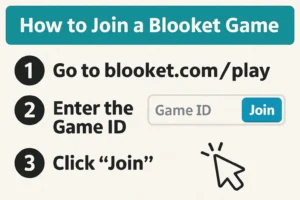
Blooket’s joining process is designed to be simple, fast, and accessible for students of all ages. Whether you’re participating in a classroom setting, joining a live game at home, or engaging in a remote learning session, Blooket offers multiple ways for players to enter a game safely and instantly. Understanding each joining method ensures that students never struggle with access, and teachers can manage game entry efficiently.
Joining a game does not require a student account, which makes Blooket ideal for classrooms with younger learners or strict privacy rules. The platform’s entry system focuses on convenience, flexibility, and secure participation.
This section explains all possible ways to join a Blooket game: using a game code, QR code, direct link, or accessing solo study mode.
5.1 Using a Game Code
The Game ID, often referred to as the “game code,” is the most common way for students to join a live Blooket session. When a teacher hosts a game, Blooket automatically generates a six-digit code that acts as the room key. Only those with the code can enter, which creates a safe environment.
How It Works
- The teacher hosts a game.
- A six-digit Game ID appears on their screen.
- Students enter the code on the Blooket homepage.
- The teacher approves player entry (if settings require it).
- The game begins when everyone has joined.
This process ensures that only invited participants can enter, preventing random individuals from disrupting the session.
Step-by-Step Instructions for Students
- Open a web browser.
- Go to Blooket.com.
- Click “Join a Game.”
- Type the six-digit code in the box.
- Enter a nickname (or auto-generated name if enabled).
- Join the waiting lobby.
Nicknames can be teacher-controlled, randomized, or student-chosen depending on host settings.
Benefits of Using a Game Code
- Fast and straightforward
- Secure access for only invited players
- Ideal for classrooms
- Does not require accounts
- Works on any device
Game Codes remain the most widely used method across classrooms globally.
5.2 Using QR Codes
QR codes are a simple and modern alternative to manually typing the Game ID. Blooket automatically generates a scannable QR code whenever a teacher hosts a game. This method is especially useful for:
- Younger students who struggle typing numbers
- Tablet or smartphone classrooms
- Tech-forward learning environments
How to Join Using a QR Code
- The teacher displays the QR code on a screen.
- Students open their phone or tablet camera.
- They point the camera at the QR code.
- A link automatically appears.
- Students tap the link and enter the game instantly.
This process removes the risk of typing errors and speeds up entry time significantly.
Why Teachers Love QR Code Entry
- Perfect for quick transitions
- Great for elementary classrooms
- No spelling or number mistakes
- Faster than typing
- Great for BYOD environments (Bring Your Own Device)
Students often prefer this method because it feels modern and effortless.
5.3 Using Direct Links
Blooket also allows hosts to share direct joining links. This option is particularly effective in remote learning sessions, Google Classroom assignments, email invitations, and LMS platforms like Canvas or Schoology.
How It Works
- The teacher hosts a game.
- Blooket generates a unique game URL.
- The teacher copies and shares the link.
- Students click the link and join instantly.
This eliminates the need for codes or scanning, making it ideal for virtual learning.
Where Teachers Often Share Links
- Google Classroom posts
- Microsoft Teams chats
- Zoom or Meet chat boxes
- School email
- LMS announcements
- Group messaging apps for homeschoolers
This method ensures that remote students can join just as easily as those in physical classrooms.
5.4 Solo Study Mode
Although Blooket is widely known for its multiplayer features, many students use it independently for studying or practicing content on their own. Solo mode is perfect for:
- Homework
- Skill practice
- Test review
- Reinforcement after lessons
- Homeschool assignments
How to Access Solo Mode
- Go to Blooket.com.
- Log in (students can play without accounts, but saving progress requires one).
- Navigate to a question set through Discover or My Sets.
- Click “Solo” or “Study Mode” (depending on the game).
- Select a game mode available for single-player use.
- Begin practicing at your own pace.
Not all modes are available for solo play, but popular ones like Tower Defense and Cafe Mode work perfectly for individual study.
Benefits of Solo Mode
- No pressure from competition
- Students learn at their own pace
- Ideal for targeted review
- Fun learning without needing a host
- Great for differentiated instruction
Teachers often assign solo mode for homework so students can practice outside class.
Why Multiple Joining Methods Matter
Every classroom is different. Some have laptops, some have tablets, and others may be remote. Blooket’s flexible joining options ensure seamless access even in:
- Hybrid classrooms
- Remote learning sessions
- Special education environments
- BYOD settings
- Homeschool environments
The platform’s joining options remove barriers to entry and ensure every learner can participate with minimal difficulty.
How to Host a Game
Hosting a game on Blooket is one of the most exciting and powerful features the platform offers, especially for teachers and educators who want to transform lessons into interactive and enjoyable learning experiences. Blooket’s hosting system is designed to be user-friendly, highly customizable, and flexible enough to work in classrooms, online sessions, tutoring environments, or at home. Whether you’re new to Blooket or looking to improve your hosting skills, this section provides a complete guide on every step—from setting up your first game to reviewing student performance afterward.
6.1 Step-by-Step Process to Host a Game
Hosting a Blooket game begins with selecting a question set and then choosing the game mode you want to use. The entire process only takes a few minutes, even for beginners.
Step 1: Log In to Your Account
Visit Blooket.com and log in as a teacher. Students usually do not host games, though accounts allow them to do so for fun or practice.
Step 2: Choose or Create a Question Set
You can either:
- Create your own set by clicking “Create,”
- Use an existing set from “My Sets,” or
- Find one through Discover by searching thousands of public sets.
Once you choose your set, click “Host”.
Step 3: Select a Game Mode
Blooket offers many game modes such as:
- Tower Defense
- Gold Quest
- Battle Royale
- Crazy Kingdom
- Factory
- Cafe
…more modes appear during events or seasonal updates.
Each mode changes how students engage with questions—for example, some prioritize speed, others focus on strategy.
Step 4: Configure Game Settings
Each game mode offers many customizable settings, such as:
- Time Limit (how long the game runs)
- Winner Criteria
- Power-ups enabled or disabled
- Randomized names
- Allow or deny late-joiners
- Nickname filters
- Question order
These settings allow teachers to control the pace, fairness, and difficulty of the session.
Step 5: Start the Game and Display the Entry Screen
Once you confirm your settings, Blooket generates:
- A six-digit game code
- A QR code
- A join link
These appear on the screen so students can join using whichever method works best for them.
Step 6: Wait for Players to Join
As students enter the game lobby, you will see:
- Their nicknames
- Their avatars
- A player count
You can remove inappropriate names or lock the lobby after a certain number of players join.
Step 7: Begin the Game
Once everyone has joined, click Start.
Students immediately begin answering questions and interacting with the chosen game mode.
6.2 Choosing a Game Mode
Blooket offers modes designed for:
- Speed
- Strategy
- Competition
- Collaboration
- Solo learning
The experience varies significantly depending on the mode. For example:
- Gold Quest is unpredictable and fun for reviews.
- Battle Royale is great for team competitions.
- Tower Defense is perfect for long class periods or homework assignments.
- Crazy Kingdom works well for independent or quiet classroom work.
Choosing the right mode can dramatically influence engagement.
Tips for Selecting the Best Mode
- For younger children, use simpler modes like Gold Quest or Cafe.
- For longer lessons, try Crazy Kingdom or Tower Defense.
- For high-energy classes, Battle Royale increases excitement.
- For test prep, use Classic or Factory mode.
6.3 Game Settings (Advanced Customization)
Blooket settings give teachers significant control over gameplay. These features allow educators to adapt the game to different classroom needs.
Common Setting Options
- Time Limit
Control how long the game runs—ideal for bell activities or quick warm-ups. - Player Limit
Free accounts allow up to 60 players; Plus accounts allow up to 300. - Late Join
Perfect for classrooms where students arrive at different times. - Random Names
Prevent inappropriate usernames and keep anonymity. - Power-up Balancing
Maintain fairness by enabling or disabling certain game features. - Homework Mode
Convert any set into a self-paced assignment with a due date.
Game settings ensure that the Blooket experience aligns with your classroom structure and learning objectives.
6.4 Sharing the Game Code
Once hosting begins, you share the game room with your players using:
- Game ID (six-digit code)
- QR Code
- Direct join link
Best Practices for Sharing Codes
- Post the link in Google Classroom for remote learning.
- Project the QR code on a board for in-person classes.
- Verbally repeat the Game ID for younger students.
- Lock the game after everyone joins to prevent disruptions.
Sharing the code is the simplest and most efficient way to onboard players quickly.
6.5 Reviewing Results After the Game
One of Blooket’s strengths is its robust results-tracking system, which helps teachers understand student performance beyond gameplay.
After ending a game, teachers can see:
- Total points earned
- Accuracy rates
- Time spent on questions
- Correct vs. incorrect answers
- Individual vs. team performance
These insights help teachers:
- Identify knowledge gaps
- Adjust future lessons
- Create targeted interventions
- Offer personalized feedback
If you’re a Plus subscriber, the reporting system becomes even more detailed, providing historical tracking and downloadable results.
Why Hosting Matters for Teaching
Hosting games transforms passive lessons into vibrant, interactive activities. It supports:
- Differentiated instruction
- Gamified learning
- High student engagement
- Increased retention
- Classroom community building
- Real-time assessment
Blooket hosting is simple yet pedagogically powerful, making it one of the most effective game-based learning tools available.
Game Modes Explained
Blooket’s game modes are the heart of the platform—each one transforming a standard quiz into a dynamic, interactive experience that appeals to different types of learners. These modes are what make Blooket unique compared to traditional quiz platforms like Kahoot or Quizizz. Instead of relying solely on speed and accuracy, Blooket incorporates strategy, luck, resource management, and creativity into gameplay. As a result, reviewing class material becomes fun, competitive, and highly engaging.
Below is a detailed explanation of the most popular game modes, how each works, and why teachers and students love them.
7.1 Gold Quest
Gold Quest is one of Blooket’s most iconic and chaotic game modes. It combines quiz answering with treasure hunting and luck-based mechanics. Students answer questions correctly to earn opportunities to open treasure chests.
How It Works
- Students answer a question.
- If correct, they choose one of three chests.
- Each chest contains either:
- Gold
- A power-up
- A negative effect
- Nothing at all
- Gold
Some chests contain double gold, while others may steal gold from other players or swap gold totals entirely.
Why Students Love It
- The unpredictability keeps the game exciting.
- Players do not always need the fastest speed to win.
- Even struggling students can win through lucky chest rewards.
Why Teachers Love It
- Great for mixed-ability classes.
- Keeps engagement extremely high.
- Works well for warm-ups, reviews, or end-of-day activities.
Gold Quest is perfect when the goal is to energize the classroom and make learning memorable.
7.2 Tower Defense
Tower Defense is a unique single and multiplayer game mode that blends traditional quiz mechanics with strategy and resource management—making it one of the most beloved Blooket modes.
How It Works
- Students answer questions to earn “tokens.”
- Tokens are used to build or upgrade towers.
- Towers attack waves of enemies that get progressively stronger.
- Students try to survive as long as possible or reach the highest wave.
Gameplay Strategy
Players must:
- Choose the best towers
- Upgrade wisely
- Balance offense and defense
- Manage resources effectively
This makes the game challenging and appealing to older students as well.
Why Students Love It
- Feels like a real video game.
- Requires skill, not just luck.
- Progress is satisfying and visible.
Why Teachers Love It
- Works well for long class periods.
- Encourages critical thinking and planning.
- Excellent for homework since students can play solo.
Tower Defense is ideal for STEM classes or any lesson that benefits from problem-solving and strategy.
7.3 Crazy Kingdom
Crazy Kingdom is one of Blooket’s most complex game modes and focuses heavily on decision-making rather than fast-paced competition.
How It Works
- Students manage a virtual kingdom.
- Characters (visitors) arrive with requests.
- Students must decide to accept or deny requests based on four resources:
- Happiness
- People
- Resources
- Money
If any resource drops to zero, the game ends.
Key Elements
- Students must think critically about consequences.
- Success requires balancing multiple priorities.
- Every decision affects future outcomes.
Why Students Love It
- Feels like a story-based adventure.
- Less pressure since it’s not speed-based.
- Rewards thoughtful choices.
Why Teachers Love It
- Promotes reading comprehension.
- Encourages critical thinking and cause-effect reasoning.
- Excellent for quiet, focused classroom periods.
Crazy Kingdom works especially well in ELA, social studies, and problem-solving lessons.
7.4 Battle Royale
Battle Royale transforms quizzes into a head-to-head or team-vs-team elimination challenge. This mode is highly competitive and exciting, making it a favorite for review games.
How It Works
- Students are paired randomly or chosen manually.
- Each pair answers the same question.
- The player who answers correctly (or faster, depending on settings) wins the round.
- The loser is eliminated.
- Winners advance until only one champion remains.
Team Battle Royale
Teachers can also set the game to team mode, where groups of students work together.
Why Students Love It
- High energy and thrilling.
- Feels like a real competition.
- Encourages teamwork in team mode.
Why Teachers Love It
- Perfect for test prep.
- Keeps students highly engaged.
- Encourages accuracy over guessing.
Battle Royale is ideal for upper grades who enjoy fast-paced, competitive activities.
7.5 Other Popular Modes
Classic
The most straightforward mode. Students answer as many questions as possible in the time limit. Great for quick assessments.
Factory
Players answer questions to earn units that produce money. Strategy matters because different units earn different amounts.
Cafe Mode
Students run a café by serving customers. They must answer questions to restock food items. Great for younger students.
Farming Mode
A seasonal mode where players grow crops using points—not always available year-round.
Seasonal or Event Modes
Blooket often releases limited-time modes:
- Santa’s Workshop
- Halloween-themed games
- Valentine events
These increase excitement during holidays.
Why Blooket’s Game Modes Are So Effective
Unlike traditional quiz platforms, Blooket:
- Reduces stress by making learning feel like a game.
- Supports different learning styles.
- Combines knowledge + strategy, not just speed.
- Gives every student a chance to win.
- Turns repetitive practice into something enjoyable.
The variety ensures that students never feel bored—even when reviewing the same content multiple times.
Blooket Plans & Pricing
Blooket offers a range of plans to meet the needs of different users—from individual students and teachers to larger classrooms and schools. Understanding the plans, pricing, and features is essential for educators who want to maximize engagement without exceeding budget limitations. Blooket balances a free, accessible option with premium tiers that unlock advanced tools, analytics, and customization options.
8.1 Free Plan
The Free Plan is Blooket’s baseline offering and provides sufficient functionality for most casual classroom use. It’s particularly popular among teachers and students who are just starting with Blooket or who prefer to avoid subscription costs.
Features of the Free Plan
- Access to most game modes, including Gold Quest, Tower Defense, and Classic.
- Ability to create question sets with multiple-choice, true/false, and open-ended formats.
- Play in class or remotely with game codes, links, or QR codes.
- Students can earn points/coins in games.
- Basic reporting of results at the end of a game.
Limitations
- Limited number of custom question sets.
- Access to analytics and class management tools is restricted.
- Premium blooks (special characters or skins) are unavailable.
The Free Plan is ideal for:
- Teachers exploring Blooket for the first time.
- Short quizzes or fun activities without intensive tracking.
- Home or homeschool learning.
It provides a low-cost entry point and allows users to assess whether premium features would be worthwhile.
8.2 Plus Plan
The Plus Plan is designed for educators or schools that want to enhance classroom engagement with more tools and flexibility. This subscription unlocks premium game modes, more customization, and analytics.
Features of the Plus Plan
- Unlimited custom question sets.
- Access to all game modes, including seasonal or advanced modes.
- Detailed analytics for student performance.
- Advanced class management tools:
- Track student progress over time
- Export game results for grading or assessment
- Track student progress over time
- Access to premium blooks for more visual and interactive gameplay.
Benefits for Teachers
- Can create highly targeted quizzes for specific standards or lessons.
- Monitor which students need extra support.
- Encourage healthy competition with premium rewards.
Pricing
The Plus Plan is generally priced at a monthly or annual rate (prices may vary based on region or school subscriptions). Annual subscriptions usually offer cost savings.
8.3 Plus Flex Plan
The Plus Flex Plan is Blooket’s most versatile option, offering pay-as-you-go flexibility. It’s ideal for schools or educators who may not need a full subscription year-round but want access to premium features for short-term projects or seasonal use.
Features of Plus Flex
- Purchase credits or passes that unlock premium features temporarily.
- Perfect for:
- Special review weeks
- Exam preparation periods
- Holiday-themed activities
- Special review weeks
- Includes all features of the Plus Plan for the duration of the credit use.
Advantages
- No ongoing monthly or yearly commitment.
- Can test premium features before committing to a full subscription.
- Useful for occasional educators or guest teachers.
8.4 Features Comparison Table
| Feature | Free Plan | Plus Plan | Plus Flex |
| Access to All Game Modes | ✅ Most | ✅ All | ✅ All |
| Custom Question Sets | Limited | Unlimited | Unlimited |
| Analytics & Reports | Basic | Detailed | Detailed |
| Premium Blooks & Skins | ❌ | ✅ | ✅ |
| Class Management Tools | Basic | Advanced | Advanced |
| Seasonal/Event Modes | Limited | ✅ | ✅ |
| Cost | Free | Paid | Pay-as-you-go |
8.5 Choosing the Right Plan
- For individual teachers or homeschoolers: Start with the Free Plan, then upgrade to Plus for full analytics and custom content.
- For schools or districts: Plus or Plus Flex offers centralized tracking and enhanced engagement.
- For occasional or seasonal use: Plus Flex provides the flexibility to purchase access only when needed.
By understanding these options, educators can ensure they select the right combination of features, affordability, and student engagement. Blooket’s pricing model is designed to be accessible, making gamified learning viable for nearly any classroom.
Season 5 Update (What’s New)
Blooket constantly evolves to keep students engaged and educators empowered, and the Season 5 update is one of the platform’s most exciting transformations. This update introduces new blooks, game modes, events, and enhanced study features designed to increase interactivity, motivation, and classroom effectiveness. Understanding these updates allows teachers to leverage Blooket’s full potential while keeping gameplay fresh and stimulating.
9.1 New Blooks
Blooks are the collectible characters or avatars students use in Blooket games. Season 5 introduces a variety of new blooks, offering students more visual variety and incentive to participate actively in games. These blooks are often themed around holidays, pop culture, or educational concepts, creating excitement for students as they progress through games and earn rewards.
Impact on Engagement
- Students are more motivated to participate because new blooks provide collectible rewards.
- Teachers can tie blook unlocks to achievement milestones, promoting positive reinforcement.
- Variety in blooks allows teachers to customize games for different age groups and classroom themes.
The introduction of new blooks also encourages friendly competition, but Blooket balances this with features that reward effort and participation, reducing the likelihood of stress or discouragement among students who might not be top scorers.
9.2 New Game Modes
Season 5 adds innovative game modes that expand the ways teachers can review content. These modes are designed to appeal to different learning styles, from competitive players to reflective learners.
Highlighted Modes
- Battle Royale Enhancements: Improves pacing and strategy for competitive students.
- New Collaborative Modes: Encourage teamwork, where students can form groups and earn collective rewards.
- Adaptive Challenges: These adjust difficulty based on student performance, ensuring games are neither too easy nor too frustrating.
Benefits in Learning
- Supports differentiated instruction by catering to diverse student skill levels.
- Adds excitement to review sessions, keeping students attentive.
- Encourages repeated gameplay for mastery without boredom.
9.3 New Events
Season 5 also introduces timed events that occur within Blooket. These events are often themed around holidays, global observances, or educational milestones. For instance, a math-focused event might challenge students with puzzles to earn limited-time blooks or coins.
Educational Value
- Events make learning dynamic and time-sensitive, motivating students to participate promptly.
- They provide contextual learning opportunities, such as Earth Day events with environmental-themed questions.
- Teachers can align events with curriculum goals, creating lessons that are both engaging and standards-aligned.
9.4 Study Mode Enhancements
Blooket’s Study Mode is one of its most powerful updates in Season 5. Unlike traditional gameplay, Study Mode allows students to practice at their own pace without the pressure of competition.
Features of Study Mode
- Students can review previous question sets to reinforce knowledge.
- Immediate feedback helps students identify knowledge gaps.
- Teachers can assign study sessions as homework or supplemental practice.
- Supports spaced repetition techniques, enhancing long-term retention.
Benefits for Students
- Reduces anxiety often associated with competitive gameplay.
- Encourages independent learning and self-assessment.
- Allows differentiation for students who need more practice on specific topics.
9.5 Overall Impact of Season 5
Season 5 transforms Blooket from a simple game-based platform into a comprehensive learning tool. With new blooks, dynamic game modes, seasonal events, and enhanced study features, teachers can create more engaging, flexible, and personalized learning experiences. It also reflects Blooket’s commitment to keeping content relevant, fun, and aligned with educational best practices.
By integrating these updates into lesson planning, teachers can increase student participation, improve retention of material, and create a classroom culture that values both learning and fun.
Using Blooket for Teaching & Learning
Blooket is not just a fun gaming platform; it’s a powerful educational tool that can transform traditional teaching into an interactive, student-centered learning experience. With its diverse game modes, flexible customization options, and real-time analytics, Blooket allows teachers to create lessons that are both engaging and effective. This section explores classroom use cases, homeschooling applications, formative assessments, and alignment with educational technology frameworks.
10.1 Classroom Use Cases
Blooket is ideal for classroom instruction across various subjects. Its adaptability allows teachers to use it for review sessions, formative assessments, enrichment activities, and even for introducing new topics.
Math
- Teachers can create question sets covering arithmetic, fractions, geometry, algebra, and more.
- Game modes like Tower Defense or Gold Quest encourage repeated practice, helping students reinforce concepts while staying engaged.
- Blooket analytics allow teachers to identify areas where students struggle and tailor instruction accordingly.
Science
- Question sets can cover biology, chemistry, physics, or environmental science topics.
- Competitive game modes foster problem-solving and critical thinking, as students apply knowledge quickly to answer questions.
- Study Mode is especially effective for memorizing terms, formulas, and scientific processes.
Language Arts
- Vocabulary, grammar, spelling, and reading comprehension questions work well in Blooket games.
- Game-based learning encourages students to practice skills in a low-stress environment.
- Teachers can use story-based blooks or themed games to enhance engagement with literature or language exercises.
Social Studies
- Question sets can explore history, geography, civics, or cultural studies.
- Interactive gameplay makes it easier for students to remember dates, events, and facts.
- Teachers can integrate maps, images, or short passages to make content more engaging.
Overall, classroom use of Blooket transforms lessons from passive learning into active participation, helping students retain information more effectively while making lessons fun and interactive.
10.2 Homeschooling
Blooket is particularly useful for homeschooling environments, where maintaining engagement can be challenging. Its flexibility allows parents to:
- Customize lessons according to the child’s curriculum or personal interests.
- Use game modes for solo learning or multi-child collaborative play.
- Track progress with built-in analytics, helping parents identify strengths and weaknesses.
The platform’s visual and interactive elements make it easier for children to stay motivated, especially when traditional worksheets may feel monotonous.
10.3 Formative Assessment
Blooket functions as a formative assessment tool, allowing teachers to monitor student understanding in real time. Unlike traditional assessments, Blooket:
- Provides immediate feedback, helping students recognize mistakes and learn from them instantly.
- Collects data on student performance, which teachers can use to adjust lessons or provide targeted support.
- Encourages low-stakes assessment, which can reduce test anxiety while still providing valuable insights.
Formative assessments in Blooket are particularly effective when used consistently, allowing educators to track progress over time rather than relying on a single test score.
10.4 SAMR & ISTE Alignment
Blooket also aligns well with educational technology frameworks like SAMR (Substitution, Augmentation, Modification, Redefinition) and ISTE standards:
- SAMR: Blooket can augment traditional learning by replacing paper quizzes with interactive games and redefine learning experiences by enabling collaborative, game-based problem solving.
- ISTE: Blooket supports empowered learning by promoting creativity, engagement, and digital citizenship. It also encourages data-driven decision-making, as educators can track student progress through detailed analytics.
By incorporating Blooket thoughtfully, teachers can enhance digital learning strategies, increase engagement, and foster a growth mindset in students.
Blooket is more than a quiz tool—it’s a multi-dimensional educational platform that makes learning engaging, data-informed, and student-centered. Whether used for review, enrichment, or independent study, it supports differentiated instruction, formative assessment, and the integration of technology into the classroom in meaningful ways.
Tips & Tricks for Using Blooket Effectively
While Blooket is intuitive and user-friendly, maximizing its educational impact requires strategic planning and smart use of features. This section covers practical tips for creating better question sets, managing classroom competition, maintaining focus, and engaging students effectively during gameplay.
11.1 Creating Better Question Sets
The quality of a Blooket game depends heavily on the question sets. Teachers and parents can significantly enhance learning outcomes by focusing on these elements:
- Clear and Concise Questions:
Questions should be straightforward and unambiguous. Avoid long, confusing sentences, as these can distract students from the actual content. - Align Questions With Learning Goals:
Each question should have a clear purpose, whether reinforcing a concept, testing comprehension, or encouraging critical thinking. Align questions with curriculum standards to ensure they are meaningful. - Use a Variety of Question Types:
Mix multiple-choice questions with true/false, matching, or scenario-based questions. This variation keeps students engaged and challenges them to apply knowledge in different ways. - Include Real-World Applications:
Questions that relate to everyday life or practical examples can make abstract concepts more relatable. For instance, in math, use word problems tied to shopping or sports. - Add Images and Media:
Visual cues, charts, or short video clips can enhance comprehension and make games more engaging, especially for younger students or visual learners. - Review and Test Questions:
Before hosting a game, test questions yourself or with a colleague to ensure clarity and correctness. Incorrect or confusing questions can frustrate students and reduce engagement.
By carefully crafting question sets, educators can transform Blooket games into high-quality learning experiences, not just entertainment.
11.2 Reducing Competition Stress
Blooket’s competitive nature can motivate students, but it can also cause anxiety for some learners. To maintain a healthy competitive environment:
- Focus on Team Play:
Use team-based game modes like Battle Royale or Tower Defense, where students work together rather than individually competing. This encourages collaboration over stress. - Use Solo Study Mode:
For students who may feel pressure in multiplayer games, the Solo Study Mode allows them to practice without the stress of competition while still tracking progress. - Highlight Effort Over Winning:
Praise students for accuracy, improvement, and participation, rather than just top scores. Recognizing effort encourages a growth mindset and reduces anxiety. - Set Clear Rules and Expectations:
Make sure students understand that games are meant to reinforce learning and enjoyment, not just to compete for points or coins.
11.3 Keeping Students Focused
Maintaining attention during Blooket sessions is crucial, especially in larger classes. Effective strategies include:
- Short, Engaging Sessions:
Limit gameplay to 10–15 minutes to prevent fatigue. Multiple shorter sessions are more effective than one long, exhaustive game. - Rotate Game Modes:
Switching between modes (Gold Quest, Tower Defense, Crazy Kingdom) keeps gameplay fresh and prevents boredom. - Mix Questions From Different Topics:
Include a variety of subjects or skill levels in a single session to maintain curiosity and challenge students intellectually. - Use Real-Time Feedback:
The immediate scoring system helps students stay engaged. Encourage them to reflect on mistakes and try again, promoting active learning.
11.4 Engaging Students During Gameplay
Beyond mechanics, student engagement depends on interaction, creativity, and motivation:
- Incorporate Student-Created Questions:
Let students create their own questions for peers. This increases ownership of learning and encourages higher-order thinking. - Set Incentives and Milestones:
Use Blooket coins or small classroom rewards to motivate students, without making it overly competitive. - Encourage Discussion:
After each game, discuss answers as a group. This reinforces learning, addresses misconceptions, and encourages peer learning. - Use Thematic Games:
Theme your games around holidays, events, or classroom topics to make the experience more immersive and enjoyable.
Safety, Privacy & Eligibility
While Blooket is an engaging educational platform, safety, privacy, and age-appropriate use are critical concerns for teachers, parents, and students. Ensuring a secure environment helps maintain trust, compliance with regulations, and effective learning experiences.
12.1 Age Restrictions
Blooket is designed primarily for students aged 13 and above, although younger students can participate under adult supervision. Here’s a closer look at age guidelines:- Minimum Age Requirement:
Most of Blooket’s features are intended for users 13+. This is aligned with the Children’s Online Privacy Protection Act (COPPA) in the United States, which restricts collection of personal information from children under 13 without parental consent. - Younger Students:
Students under 13 can use Blooket safely if a teacher or parent creates and manages their accounts. In such cases:- Accounts should avoid sharing personal information.
- Educators or parents should actively monitor activity.
- Question sets and game content should be age-appropriate.
- Compliance:
Teachers and parents must ensure that students meet age requirements to remain compliant with local laws. Using Blooket responsibly helps protect both students and institutions from privacy and liability issues.
- Minimum Age Requirement:
12.2 Accounts for Kids Under 13
For children under 13, Blooket provides teacher-managed solutions:- Classroom Accounts:
Teachers can create a single classroom account and invite students to participate using game codes or QR codes, eliminating the need for individual accounts. This keeps student data centralized and secure. - Limited Personal Information:
When creating accounts for younger students, only minimal personal information should be collected. Avoid using full names or birthdates to protect identities. - Parental Oversight:
Parents should be informed if their children use Blooket, especially in homeschool settings. This ensures transparency and allows adults to monitor usage and content. - Educational Focus:
Keeping younger students in teacher-controlled environments ensures that Blooket remains a safe educational tool, rather than a social platform.
- Classroom Accounts:
12.3 Classroom Privacy Considerations
Privacy in classroom settings is essential to ensure a safe and controlled learning environment:- Control Access to Games:
Use private game codes or QR codes rather than sharing public links. This prevents unauthorized access and keeps gameplay limited to intended participants. - Limit Sharing of Student Information:
Avoid posting student names, scores, or avatars publicly. Anonymize results when discussing performance in group settings to protect privacy. - Manage Communication Channels:
Blooket does not have direct messaging between students, reducing risks of inappropriate interactions. However, educators should still monitor classroom discussions linked to gameplay. - Record-Keeping and Data Security:
Blooket collects basic data for analytics and account management. Teachers should familiarize themselves with the platform’s privacy policy and ensure that sensitive data is handled responsibly. - Remote Learning:
When using Blooket for virtual classrooms, privacy settings become even more critical. Platforms like Zoom or Google Meet should also be configured to limit exposure of student information.
- Control Access to Games:
12.4 Best Practices for Safe Usage
To maximize safety while using Blooket, consider these practices:- Use Teacher Accounts for Young Students: Centralize control and supervision.
- Monitor Gameplay: Check students’ understanding and interactions in real-time.
- Educate Students About Online Safety: Teach them not to share personal information.
- Regularly Review Privacy Settings: Ensure that classroom and account settings remain up to date.
- Limit Public Sharing: Avoid posting screenshots or results publicly without permission.
- By carefully managing accounts, monitoring gameplay, and respecting privacy laws, Blooket can remain a secure, fun, and educational tool. Safety measures not only protect students but also give educators peace of mind while running interactive lessons.
Pros and Cons
Blooket has become increasingly popular in classrooms and homeschool settings, but like any educational tool, it comes with both advantages and disadvantages. Understanding its pros and cons can help educators, parents, and students decide how best to integrate it into teaching and learning.
13.1 Pros of Blooket
1. Highly Engaging and Gamified
Blooket turns traditional quizzes into interactive games, making learning more exciting and motivating. Its gamified approach:
- Encourages competition in a healthy way.
- Maintains student focus.
- Rewards participation with coins, points, and in-game achievements.
This gamification appeals to students of all ages, especially those who might struggle with conventional teaching methods.
2. Versatile Game Modes
Blooket offers multiple game modes, such as Gold Quest, Tower Defense, and Battle Royale, each catering to different learning styles. Teachers can:
- Adjust the pace and intensity of games.
- Encourage teamwork or individual practice.
- Provide variety to keep students engaged over time.
The variety ensures that lessons remain fresh, and students are less likely to become bored.
3. Customizable Question Sets
One of Blooket’s most powerful features is the ability to create and customize question sets. This flexibility allows educators to:
- Tailor content to specific subjects, grade levels, or standards.
- Focus on weak areas identified through formative assessments.
- Use multimedia, such as images or videos, to enhance questions.
Custom question sets make Blooket a versatile tool for personalized learning.
4. Analytics and Feedback
Blooket provides detailed analytics and feedback to teachers, helping them track:
- Student performance.
- Question difficulty.
- Overall class progress.
This data-driven insight allows educators to identify knowledge gaps and adjust instruction in real-time, supporting differentiated learning strategies.
5. Classroom Management and Remote Learning
Blooket supports both in-person and remote learning, providing:
- Game codes or QR codes for easy access.
- Solo study modes for independent practice.
- Tools to manage large classrooms without chaos.
These features make Blooket scalable and adaptable, whether teaching five students at home or fifty in a school setting.
6. Accessibility and Ease of Use
The platform is user-friendly for both teachers and students:
- Minimal setup required.
- Intuitive dashboards.
- Works on desktops, tablets, and smartphones.
This low barrier to entry encourages adoption and ensures that even less tech-savvy educators can use it effectively.
13.2 Cons of Blooket
1. Overemphasis on Gamification
While gamification is engaging, it may:
- Encourage competition over learning.
- Lead to focus on points or rewards rather than understanding concepts.
- Cause stress for students who are less confident in fast-paced games.
Educators need to balance game time with traditional teaching methods to prevent negative effects.
2. Limited Free Features
The free plan offers basic functionality, but advanced features, such as premium game modes and detailed analytics, require paid subscriptions. This limitation may:
- Restrict the full educational potential for classrooms with tight budgets.
- Force teachers to rely on simpler modes that may not fully support engagement.
3. Requires Internet Access
Blooket is entirely online, which can be problematic in:
- Low-connectivity areas.
- Schools with limited devices.
- Students without personal devices at home.
This dependency limits its universal accessibility.
4. Potential for Distraction
The entertaining nature of Blooket can sometimes become a distraction:
- Students may focus more on avatars, coins, or achievements than learning content.
- Overuse could reduce attention spans for traditional lessons.
Teachers must moderate gameplay to maintain focus on learning objectives.
5. Privacy Considerations
While generally safe, Blooket still requires careful handling of student data:
- Age restrictions must be respected.
- Teacher oversight is necessary for under-13 users.
- Sharing game results publicly may compromise privacy.
Compliance with privacy laws and classroom policies is essential.
13.3 Summary
Blooket’s pros include engagement, customization, analytics, accessibility, and support for remote learning. Its cons involve potential overemphasis on gamification, limitations of the free plan, internet dependency, distraction risk, and privacy concerns.
Overall, Blooket is a highly effective educational tool when used thoughtfully, but its effectiveness depends on teacher guidance, careful planning, and balanced use. It’s best suited for supplementing lessons rather than replacing traditional instruction entirely.
Frequently Asked Questions (FAQ)
Blooket has become widely used in classrooms, homeschool environments, and remote learning settings. With its growing popularity, educators, parents, and students often have many questions about how it works, its features, and best practices. This FAQ section addresses the most common queries, providing clear, practical answers to help users get the most out of the platform.
14.1 What is Blooket?
Blooket is an online learning platform that turns educational content into interactive, gamified experiences. Teachers can create quizzes or question sets that students answer in different game modes. Points, coins, and rewards are earned during gameplay, which helps make learning fun and engaging. Unlike traditional quizzes, Blooket focuses on gameplay mechanics to motivate students while reinforcing knowledge.
14.2 Who can use Blooket?
Blooket is designed for:
- Teachers: To create engaging lessons, manage classrooms, and assess student learning.
- Students: To play games, review content, and practice skills independently or in groups.
- Parents and homeschoolers: To provide structured, interactive learning at home.
Blooket is generally suitable for students of all ages, although users under 13 require teacher or parental supervision to comply with privacy regulations.
14.3 How do I create an account?
Creating a Blooket account is simple:
- Visit the Blooket website or app.
- Choose either a Teacher or Student account, depending on your role.
- Sign up using a Google account, Microsoft account, or email.
- For students under 13, teachers can create accounts and assign game codes to maintain privacy.
Teachers have access to dashboards and analytics, while students primarily use game codes to join sessions.
14.4 Is Blooket free?
Blooket offers both free and paid plans:
- Free plan: Provides access to basic game modes, question sets, and standard classroom management features.
- Paid plans (Plus and Plus Flex): Unlock premium game modes, advanced analytics, larger class sizes, and more customization.
Many teachers start with the free plan and upgrade only if they need additional features.
14.5 How do students join a game?
Students can join Blooket games using:
- Game codes: The most common method, where teachers provide a 6-digit code.
- QR codes: Useful for quick access, especially on tablets or phones.
- Direct links: Teachers can share a link for easy entry.
Students can also play solo study mode, practicing questions independently to reinforce learning without competing.
14.6 Can Blooket be used for remote learning?
Yes. Blooket is fully compatible with remote learning. Teachers can host games live during video calls, assign games for independent play, or integrate Blooket into learning management systems. Its online format allows students to join from anywhere, making it an excellent tool for hybrid classrooms or distance learning scenarios.
14.7 Are there any age restrictions?
Blooket requires users to be 13 or older to create their own accounts. Students under 13 can still participate if a teacher or parent creates the account and manages privacy settings. The platform complies with child online privacy regulations, ensuring safe gameplay in educational contexts.
14.8 How can Blooket help teachers track learning?
Blooket provides analytics and reports that help teachers:
- Monitor student performance.
- Identify knowledge gaps.
- Evaluate question difficulty.
- Measure overall classroom progress.
This data-driven approach allows teachers to adjust lessons, target weak areas, and implement differentiated instruction effectively.
14.9 Can I customize questions and game content?
Absolutely. Blooket allows teachers to:
- Create custom question sets.
- Include images, videos, or text-based questions.
- Share question sets with other educators.
- Adjust game settings, such as time limits or point multipliers.
Customization ensures the platform aligns with curriculum standards and learning objectives.
14.10 What devices does Blooket support?
Blooket is device-agnostic and works on:
- Desktops and laptops via web browsers.
- Tablets and smartphones through mobile browsers.
- Chromebooks commonly used in classrooms.
No additional software is needed, making it accessible for most learning environments.
14.11 What are some common challenges?
While Blooket is highly engaging, educators should be aware of:
- Overemphasis on competition for some students.
- Internet dependency, which can be an issue in low-connectivity areas.
- The potential for distraction if students focus on rewards rather than learning.
Balancing gameplay with instructional goals ensures Blooket is used effectively.
14.12 Summary
Blooket is a flexible, gamified learning platform designed to make education fun, engaging, and interactive. It can be used for classroom instruction, remote learning, or independent practice. By understanding account creation, game participation, customization, and analytics, educators and students can maximize the educational benefits while minimizing potential challenges.
Final Thoughts
Blooket has firmly established itself as one of the most engaging educational platforms in recent years. By combining game-based learning with flexibility and accessibility, it allows educators, students, and even parents to transform traditional learning into a fun, interactive experience. As we conclude this comprehensive guide, it’s important to reflect on what makes Blooket effective, how to use it optimally, and considerations for ensuring its success in any learning environment.
15.1 Why Blooket Matters in Education
At its core, Blooket addresses a common challenge in education: student engagement. Many learners struggle to remain focused during traditional instruction, and assessments can sometimes feel tedious or stressful. Blooket solves this problem by gamifying learning, providing rewards, and fostering healthy competition. Students are motivated to answer questions correctly not just for grades, but for points, coins, and in-game achievements, making learning a dynamic experience.
For teachers, Blooket offers a rich set of tools for classroom management, formative assessment, and student feedback. The ability to analyze student performance instantly allows teachers to identify knowledge gaps, adapt lesson plans, and support differentiated instruction. In short, Blooket blends learning and assessment seamlessly, providing value for both educators and learners.
15.2 Best Practices for Maximizing Blooket’s Effectiveness
To truly make the most of Blooket, there are several strategies teachers and parents should consider:
- Set clear learning objectives: Ensure every game aligns with a specific lesson goal. Avoid using Blooket solely for entertainment, as its primary purpose is learning reinforcement.
- Balance competition and collaboration: While some students thrive in competitive settings, others may feel stressed. Alternating between collaborative and competitive game modes helps maintain inclusivity.
- Customize question sets thoughtfully: Tailor content to the curriculum and your students’ needs. Include a mix of question types, difficulty levels, and multimedia elements to keep games engaging.
- Use analytics for improvement: Regularly review performance data to identify weak areas, adjust teaching strategies, and guide students toward mastery.
- Incorporate Blooket into broader lesson plans: Use it as a supplement rather than a standalone activity. For example, a short Blooket session can serve as a review, warm-up, or exit ticket.
15.3 Flexibility Across Learning Environments
One of Blooket’s strongest features is its versatility. It works equally well in traditional classrooms, remote learning scenarios, or homeschooling contexts. Teachers can host live games for interactive lessons, assign solo study sessions for independent review, or encourage friendly competition during hybrid classes. Its compatibility with multiple devices — including laptops, tablets, and Chromebooks — ensures that all students can participate, regardless of technology constraints.
Additionally, Blooket’s customization options make it adaptable for diverse subjects, from math and science to language arts and social studies. The platform’s various game modes, such as Gold Quest, Tower Defense, and Battle Royale, allow teachers to mix up gameplay to maintain excitement while reinforcing critical concepts.
15.4 Safety and Privacy Considerations
While Blooket is highly engaging, safety and privacy should remain a priority. Teachers should follow age-appropriate guidelines, ensure students under 13 participate only under supervision, and manage classroom codes responsibly to prevent unauthorized access. By maintaining these safeguards, educators can provide a safe and focused learning environment while leveraging the platform’s interactive features.
15.5 The Bottom Line
Blooket represents a modern approach to education, combining gamification, technology, and curriculum-aligned content into a single, powerful platform. Its strengths lie in engagement, adaptability, and data-driven insights, making it an excellent choice for teachers, students, and homeschoolers alike. While no tool can replace effective teaching, Blooket enhances learning experiences, encourages active participation, and provides teachers with practical tools to track progress and measure outcomes.
In conclusion, whether you are a teacher looking to spice up your classroom, a parent seeking interactive learning resources, or a student aiming to review concepts in an enjoyable way, Blooket offers a versatile, effective, and engaging solution. By thoughtfully integrating it into your teaching and learning routines, you can harness the power of gamified learning to achieve meaningful educational outcomes.